
Guide ·
Visually differentiate stage and prod in WordPress
I’ve managed a lot of WordPress sites. A LOT. And I really like wordpress. Its my preferred CMS, thanks to its flexibility, extensibility, and ubiquity (which translates into robust and well-developed template, design, plugin, security, and support ecosystems).
But I have a somewhat consistent problem. Sometimes, I’ll have both staging and production environments up on my screen at the same time. And sometimes, I’ll make a change to one of those environments. And sometimes I’ll accidentally make the change in prod instead of stage.
OOPS!
But what if there was an easy way to visually differentiate staging and production environments so you’d know which you were in just by glancing (not even fully looking, reading, or processing, but just *glancing*) at the screen? Basically, enabling you to subsconsciously process data about your environment with a visual cue rather than with a textual (word/character string) cue?
Well, I made one for you!
Our brains process words and pictures very differently. By turning the admin side bar into a visual cue instead of a textual cue, you can instantly identify which environment you are in with no effort or intent. You brain will just “get it.” (Now, if only I could do this for lots of OTHER things in my life!)
Here are the simple steps to the Staging Admin Color Plugin up and running on your site:
1. Just install the plugin by: downloading the zip file, uploading the zip file via the WordPress plugin menu, and activating it.
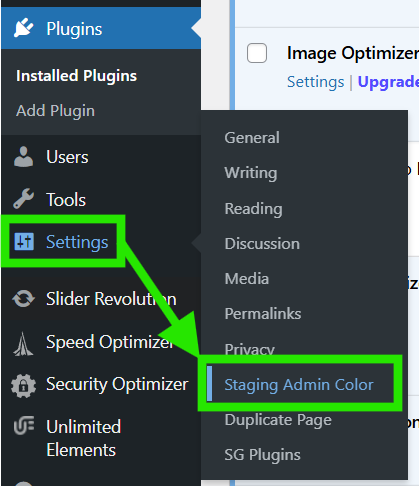
2. Then, go to “Settings” in the admin menu, then select “Staging Admin Color”
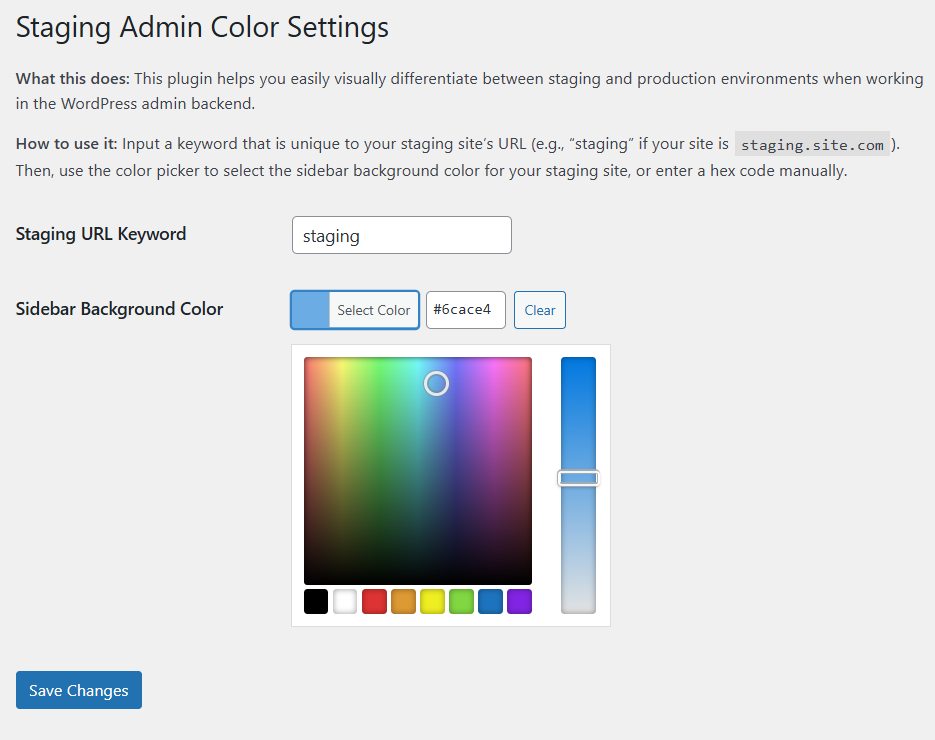
3. Last, type the persistent and unique value in your staging domain (for example, if your production site is ‘site.com,’ and your staging site is ‘staging.site.com,’ use the term “staging” as the identifier); then, use the color picker to select the color you want your admin menu to display as in staging. If you know the hex you want to use, you can input it directly in the color picker.
That’s it!
I tried to harden the plugin somewhat for security, but I offer no warranties or guarantees about its security, performance, whether or not it will call a pack of rabid wildebeest to your door, etc. But I do use it on my sites and I haven’t seen a single wildebeest in weeks.